Network access
Resilience considerations
RailLab a desktop software, so it is not as susceptible to network or hardware failures as a SaSS web app, with the exception of the computer PC where RailLab runs
If the RC License API service is unavailable, RailLab can operate for up to a week without refreshing the licence with the service.
As the licensing system is nominative (linked to the user’s Microsoft account), the end user may switch to another computer to work without any additional step
Service levels agreements
Rail Concept uses commercially reasonable efforts to make the RC License API available 24h a day every day of the week, except for:
- Planned downtime that would significantly affect RailLab features, those downtime will be given prior notice to all our clients
- Unavailability caused by circumstances beyond Rail Concept reasonable control: including for example:
- Act of government, terror, civil unrest, strike or law enforcement
- Natural disasters such as flood, fire, earthquake
- Hosting provider (Microsoft Azure) or ISP failure or delay
- Denial of service attack
We aim to fix or find a workaround within a reasonable time frame depending on the nature of malfunction every bug reported by our clients that would significantly affect their work with RailLab
The following RailLab versions are covered by this SLA:
- Clients’ in-production version
- Latest available version
We may ask and assist you to upgrade to the latest version of RailLab in order to fix the reported malfunction
Safety considerations
RailLab being a desktop software, all the work is done entirely on the end user PC and only one mandatory short lived internet access per week is mandatory
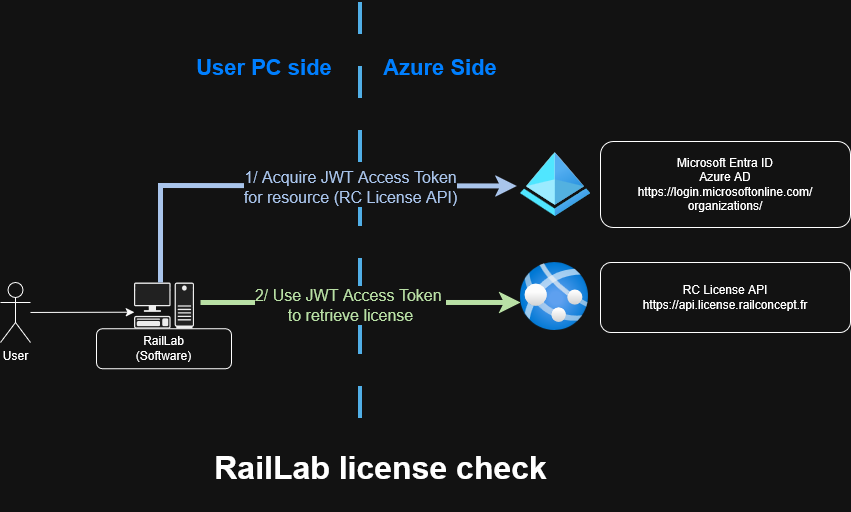
The only required service is RC License API once a week to refresh the license, obviously all communications are secured with HTTPS and users are authentified using a JWT emitted from https://login.microsoftonline.com/organizations/ authority
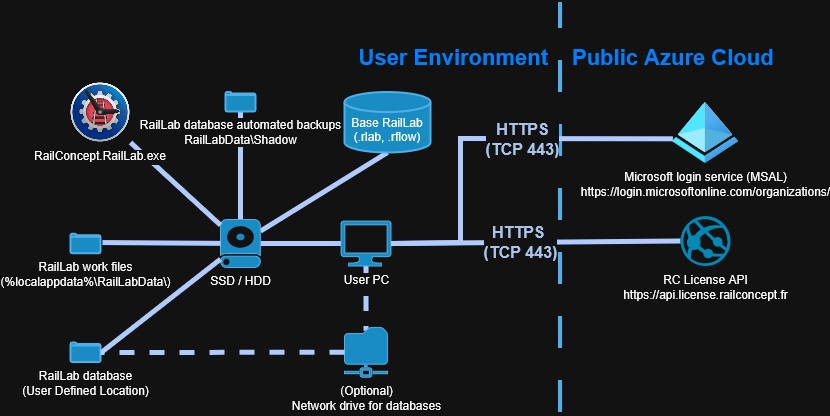
This service is the only intellectual property protection mechanism we use and we made it as lenient as possible
The call to https://api.licence.railconcept.fr is done when launching RailLab and require an internet access
This call is only mandatory for launching RailLab if the last call was made more than a week ago
This call is authentified using a JWT, more information in the RC License API and JWT Tokens section
Acquiring a license as a RailLab user
Ports to open
Assuming that there is a DNS resolution for the domain names listed below:
| Source | Destination | Port (destination) | Description |
|---|---|---|---|
| RailLab (User PC) | https://login.microsoftonline.com/organizations/ | TCP 443 (HTTPS) | Acquiring JWT through SSO |
| RailLab (User PC) | https://api.license.railconcept.fr | TCP 443 (HTTPS) | Using JWT to check license |
| RailLab (User PC) | https://api.railsync.fr | TCP 443 (HTTPS) | Optional service |
HTTP Headers
RC License API and other (optional) RailLab’s services use the Authorization and License HTTP headers to authenticate and authorize the user
RC License API
RC License API is our license management service, this allows us to manage licenses for our clients
It is hosted on the Azure Public Cloud By Rail Concept, enabling license acquisition and validation when RailLab is launched
We only log or store data that are required for technical reasons:
- Received HTTP requests (IP address, date and time of request, URL and other technical data non-PII data contained in standard HTTP requests)
- Date of first acquisition of the license
Requests are authentified by JWT that contains as few PII as necessary that is described fully and transparently more in the JWT Tokens section
HTTP API reference
Here you will find the Visual Studio’s .http file we use internally to define and test RC License API endpoints
We do not use Swagger or any additional third party tool as it doesn’t provide much for our use case, feel free to convert the file bellow to fit your integration needs
# create a local token and store it as a secret / env variable named userApiToken by running the following:
# dotnet user-jwts create --name "Test user" --scope "email" --scope "offline_access" --scope "openid" --scope "profile" --claim "email=test@railconcept.fr"

//-------------------------------------------------//
// applications
//-------------------------------------------------//

@applicationName = test-application
@applicationScope = test-application-scope
@licenseTypeName = test-license
@licenseTypeClaimValue = test-license


GET {{hostAddress}}/applications
Accept: application/json
Authorization: Bearer {{userApiToken}}
###


//-------------------------------------------------//
// client account
//-------------------------------------------------//


GET {{hostAddress}}/client-account
Accept: application/json
Authorization: Bearer {{userApiToken}}
###


GET {{hostAddress}}/client-account/autobind
Accept: application/json
Authorization: Bearer {{userApiToken}}
###

PUT {{hostAddress}}/client-account
Content-Type: application/json
Accept: application/json
Authorization: Bearer {{userApiToken}}

{
  "contactEmail": "test@railconcept.fr",
  "domainName": "{{legacyDomainName}}",
  "domainSid": "{{legacyDomainSid}}"
}
###

//-------------------------------------------------//
// licenses
//-------------------------------------------------//

POST {{hostAddress}}/licenses/reassign
Content-Type: application/json
Accept: application/json
Authorization: Bearer {{userApiToken}}

{
  "applicationName": "{{applicationName}}",
  "originalClaimerUserName": null,
  "newClaimerUserName": "reassigned.user 4"
}
###

GET {{hostAddress}}/licenses/{{applicationName}}
Content-Type: application/json
Accept: application/json
Authorization: Bearer {{userApiToken}}

###

GET {{hostAddress}}/licenses/{{applicationName}}/public-keys
Content-Type: application/json
Accept: application/json

###

//-------------------------------------------------//
// licenses inquiries
//-------------------------------------------------//

GET {{hostAddress}}/inquiries
Accept: application/json
Authorization: Bearer {{userApiToken}}
###

POST {{hostAddress}}/inquiries
Content-Type: application/json
Accept: application/json
Authorization: Bearer {{userApiToken}}

{
  "customMessage": "Requesting 10 testing licences\nAs normal user",
  "applicationName": "{{applicationName}}",
  "licenseTypeName": "{{licenseTypeName}}",
  "licenseCount": 10
}
###

@userInquiryId = 9d338c5e-033c-4623-b94c-947ff87b4214

GET {{hostAddress}}/inquiries/{{userInquiryId}}
Accept: application/json
Authorization: Bearer {{userApiToken}}
###

DELETE {{hostAddress}}/inquiries/{{userInquiryId}}
Accept: application/json
Authorization: Bearer {{userApiToken}}
###


//-------------------------------------------------//
// trainer code
//-------------------------------------------------//
@trainerCodeTest = 29SHF2T7

// will only work if user is a trainer (internal role)
POST {{hostAddress}}/training/{{applicationName}}/create-code
Accept: application/json
Authorization: Bearer {{userApiToken}}
###

GET {{hostAddress}}/training/{{applicationName}}/is-trainer
Accept: application/json
Authorization: Bearer {{userApiToken}}
###

GET {{hostAddress}}/training/{{applicationName}}/{{trainerCodeTest}}
Accept: application/json
###
JWT Tokens
JSON Web Tokens is the option we chose in order to authenticate and authorize requests for our services
JWT are acquired by RailLab using MSAL.NET against the https://login.microsoftonline.com/organizations/ endpoint
Microsoft Authentication Library is the solution we choosed:
- Standard (OpenID/OAuth2) according to RFC 6749 and RFC 9101
- Safe by design
- Free / Open Source client library
- Used widely (Teams, Outlook..)
- Easy to integrate in Windows environments already using Entra ID (Active Directory)
And set up in order to have as limited risk exposure for users as possible:
- Using only standard OAuth2 scopes:
emailoffline_accessopenidprofile0e3c8973-73c6-4ea2-be38-067983028747/.default
This is the only custom scope and is mandatory in order for MSAL to identify which service the token is emitted for
0e3c8973-73c6-4ea2-be38-067983028747is the guid identifying the RC License API OAuth application that can be consulted in theEnterprise Applicationview in your Azure Portal, more info on that process in the SSO Integration section of this documentation
- Integrate with your Azure Entra Id with no extra role management or user permission on your side
- Is an authentication and authorization procotol so no password is ever seen or manipulated by any of our softwares
For full transparency, here a sample of a real production token emitted by Microsoft login service for a RailLab user to use against RC License API:
{
  "typ": "JWT",
  "alg": "RS256",
  "kid": "g5LTbFmUG2LW1z4bMtNc_Dc-URI"
}.{
  "aud": "0e3c8973-73c6-4ea2-be38-067983028747",
  "iss": "https://login.microsoftonline.com/9d73c762-92d5-4aef-a638-631c41d05760/v2.0",
  "iat": 1769597123,
  "nbf": 1769597123,
  "exp": 1769601848,
  "aio": "AcQAO/8bAAAADpw2kH71mshLnAzTZ3izW/YSx/ccdTtsEutGnER15ot84rqvNevuPiXlKBrj7REwsvZ6/g5wk5XWOhUe9xYD78uzAqWDut2KwhW9Xs1RQogSxcUd8qYvO7FKTGtPdfX/MXq9LUEKX/5SfP9DF9IX8YD1BuJxOuB4McO2gI9AhGwgq1fMcslNXjTfeYKNbWYRfusRe6+pU9wvbMVwkr/5+q7TkPnrRQuJrLVE3aqPqb2vzOVoamf24uh6ykhu7zdo",
  "azp": "67056ce2-d9cc-4dd8-9339-58bdbff355ed",
  "azpacr": "0",
  "email": "raphael.blin@railconcept.fr",
  "name": "Raphaël Blin",
  "oid": "298afbf8-59a3-4487-88b8-96838c36a4fb",
  "preferred_username": "r.blin@railconcept.fr",
  "rh": "1.AR8AYsdzndWS70qmOGMcQdBXYHOJPA7Gc6JOvjgGeYMCh0e6AbkfAA.",
  "scp": "access",
  "sid": "00105b9a-5a3b-70a7-9e24-d6c49efa2156",
  "sub": "fNaq90VPX7bhX_qZPvVA1i_wHC01_VrqnOAMXc4O910",
  "tid": "9d73c762-92d5-4aef-a638-631c41d05760",
  "uti": "EbMKoSVD-EKQh3RPe4oLAA",
  "ver": "2.0",
  "xms_ftd": "S6TI_bL1vnObCw0AW1SuBw_tm6rcW-QR0Q3I4ayvv8MBc3dlZGVuYy1kc21z"
}.[Signature]
Here’s the same token with an explanation of each claim from jwt.ms:
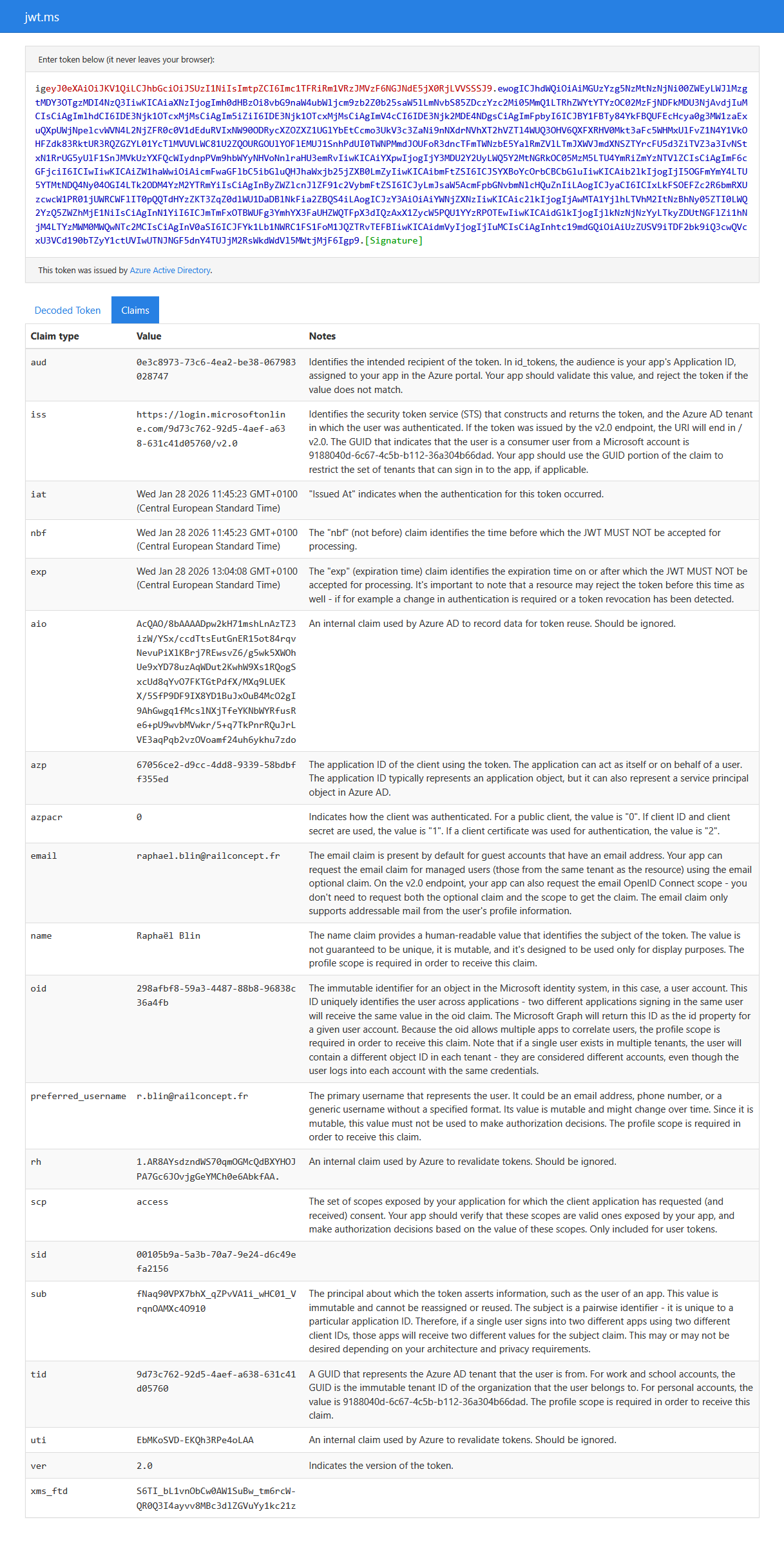
You might be thinking we are jeopardizing our security by displaying a full token in a publicly accessible documentation but:
- No claim in the token is fundamentally a secret to never publicly expose, it is a safe by design aproach with public/private key signature
As a developer my name and email are already used many times as support contact in this documentation already, this not a big deal in this situation - We didn’t include signature and reforging a signature require having access to Microsoft private key(s)
- The token is expired
- Even if this was a valid token the only things a bad actor could manage to do is access the user protected API as described in the HTTP API reference section
- Get a license unlegitimately
- List/Read applications, inquiries, user’s client account and licenses